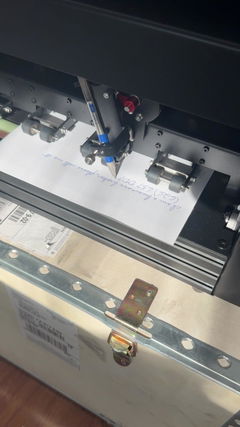
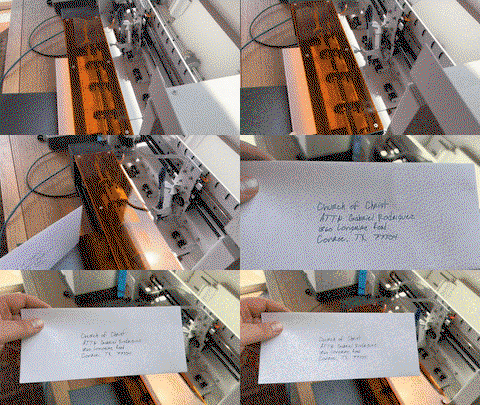
I’ve had my iAuto for about a week now and have had some time to play around with it, learn the software, and figure out how everything works. So far, I’m really happy with it! The writing looks great, and I’ve enjoyed seeing it bring my files to life on paper.
The machine itself feels well built, and the materials are high quality. The software is fairly easy to use. It took a little time to get familiar with everything, but after playing around with it for a week, I’m getting more comfortable with the process.
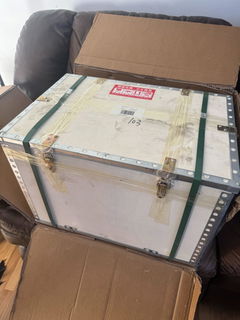
I was a bit worried about the machine getting damaged during shipping, especially coming from overseas, but I was impressed as soon as I saw how it was packaged. It came in a wooden crate with metal corners, and that was inside a box with foam all around it. They really took care to protect it for the trip, and it arrived without damage.
I’ve included a couple of pictures of the packaging so you can see how it arrived, as well as a video of the machine writing. Overall, I’m very happy with the iAuto and would definitely give it five stars!
Open-Boxed UUNA TEK® iAuto - Handwriting Machine with Feeder/Automatic Signature Machine/Handwriting Machine for Letter/Automatic Writing Machine
Min S Kim
Great drawing machine for artists
I'm happy with this machine. after getting used to the setup, it works well and the drawing results are excellent. I'm enjoying experimenting with different pens. Good for creative artwork.
UUNA TEK ArtStation 1824 | Professional Pen Plotter & Exhibition-Grade Generative Art Production System (24” × 18”)
Alexey G
First 50 letters produced a live deal conversation. It holds a real pen.
I'm a RE broker. My first batch of 50 letters brought a phone call from an owner now talking to me about selling — a deal that would carry roughly $40,000 in gross commission. These letters get opened.
This is not a printer. It's a spring-loaded clamp holding an ordinary ballpoint, on a gantry that moves the pen like a hand. You can feel the writing on the back of the page.
Ships in a plywood freight crate and sets up in ten minutes. Handles #10 envelopes and letterhead, writes cleanly around a pre-printed logo and footer. About 72 seconds per envelope, under 5 minutes per letter.
Best hidden feature: a local HTTP API with plain-JSON layouts. I used Claude Code to build a custom app that runs my whole mail room, and I don't write code. It also walked me through importing free commercial handwriting fonts — fast, and the quality is excellent, so you aren't limited to the eight in the box.
Fair warnings: you need a good database — the machine faithfully writes whatever junk you feed it. Load one spare sheet per stack; the feeder can miss the last one. And I've only had it a short while, so I can't speak to long-term durability yet.
Absolutely worth the money.
UUNA TEK® iAuto - Handwriting Machine with Feeder/Automatic Signature Machine/Handwriting Machine for Letter/Automatic Writing Machine, Write Up to 80 Letters, 30 Envelops Per Load
Casey Avery
Great build quality, great support ... unlimited uses!!!
We’ve had the iAuto Plus for about 10 months now and have run 10,000+ pieces through it. Overall, really happy with it. The actual machine is built well and the writing looks great because, well, it’s literally a real pen writing it. There is a bit of a learning curve and the software could be better, but once you get your setup figured out it works really well. Would definitely buy again. My tip is to get CREATIVE. If you do any kind of sales, marketing, customer appreciation... it will pay for itself fast.
UUNA TEK® iAuto Plus - Handwriting Machine with Feeder/Automatic Signature Machine/Handwriting Machine for Letter/Automatic Writing Machine, Write Up to 210 Letters, 80 Envelops Per Load
Vance Adair
A Gamechanger
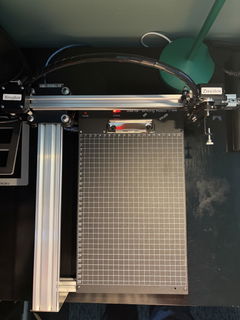
I have only just unboxed the UUNA TEK iDraw 2.0, and I’m already using it to draft ideas for my own artwork. First impressions are extremely positive.
The machine arrived very securely packaged, and assembly was remarkably straightforward. UUNA TEK’s video tutorial on YouTube is clear, concise and very easy to follow, so I had the plotter assembled and ready to go with very little effort.
Setting it up with Inkscape was equally painless. It was simply a matter of opening the Inkscape Extensions folder and copying across the extension supplied in the zipped file from UUNA TEK. Once that was done, the iDraw controls were immediately available within Inkscape and I was ready to start experimenting.
What has impressed me most so far is the sheer robustness of the machine. It feels like a serious, well-engineered piece of equipment rather than a lightweight hobby gadget. The speed of the drawing is also impressive, while retaining excellent precision.
Perhaps its greatest strength, though, is how intuitively it can slot into an existing creative workflow. There is remarkably little faffing around, recalibration or technical fuss between having an idea on screen and seeing it physically drawn. For a creative tool, that matters enormously: the technology quickly gets out of the way and allows you to concentrate on what you are actually making.
The iDraw 2.0 clearly has a multitude of potential uses, but for me, as a way of drafting, developing and physically exploring ideas for my own art, I suspect it is going to prove invaluable.
A great buy, extremely well made, impressively fast and refreshingly straightforward to use.